Tap your laptop. Switch anything.
QuickTap turns the body of your laptop into a button. One tap to switch apps, cycle windows, or panic-hide whatever's on screen. No hotkey, no trackpad — just a tap.
Free download · macOS 14+ · Intel & Apple Silicon · see how it works
Built for window-jugglers.
QuickTap doesn't care what you do with your tap. It just gives you a button that's always under your fingers.
Drowning in windows.
Tap to cycle through everything that's open. Faster than ⌘-Tab and you don't have to lift your hand off the keyboard.
Tabs you'd rather not explain.
One tap and your screen looks like work again. Tap back later — same tabs, no panic.
Boss-key, reinvented.
Lecture, notes, Discord, PDF.
Tap through every app open on your laptop without ever clicking a thing.
Your boss is two desks away.
Tap the lid. The browser is gone. Slack is on top. You look productive. They keep walking. Tap again later — your tabs are right where you left them.
No frantic ⌘-W. No mouse pointer flying to the dock. Just a small, casual tap nobody notices.
Boss approaches.
One tap on the lid.
Looking good.
One tap. Many tricks.
Small, focused, and out of your way. QuickTap does one thing and tries to be excellent at it.
Physical tap detection
QuickTap reads the laptop's built-in motion sensor. No external hardware. No hotkey to memorize.
Pick what a tap does
Switch app, cycle windows, hide screen, or run a keyboard shortcut. Choose the action that fits your workflow — change it whenever you want.
Adjustable sensitivity
From gentle finger tap to firm knuckle rap. Tune QuickTap to your desk, your laptop, your touch.
Lives in your menu bar
A small icon at the top of your screen. No dock clutter, no floating window, no Electron.
Works offline
QuickTap doesn't talk to the internet. No account, no cloud, no telemetry. It can't phone home — there's no home.
Light on your laptop
A few megabytes of memory. Almost zero CPU when idle. Your fans won't notice it's running.
Under the hood.
A quick tour of QuickTap's settings — where you map your trackpad to actions.
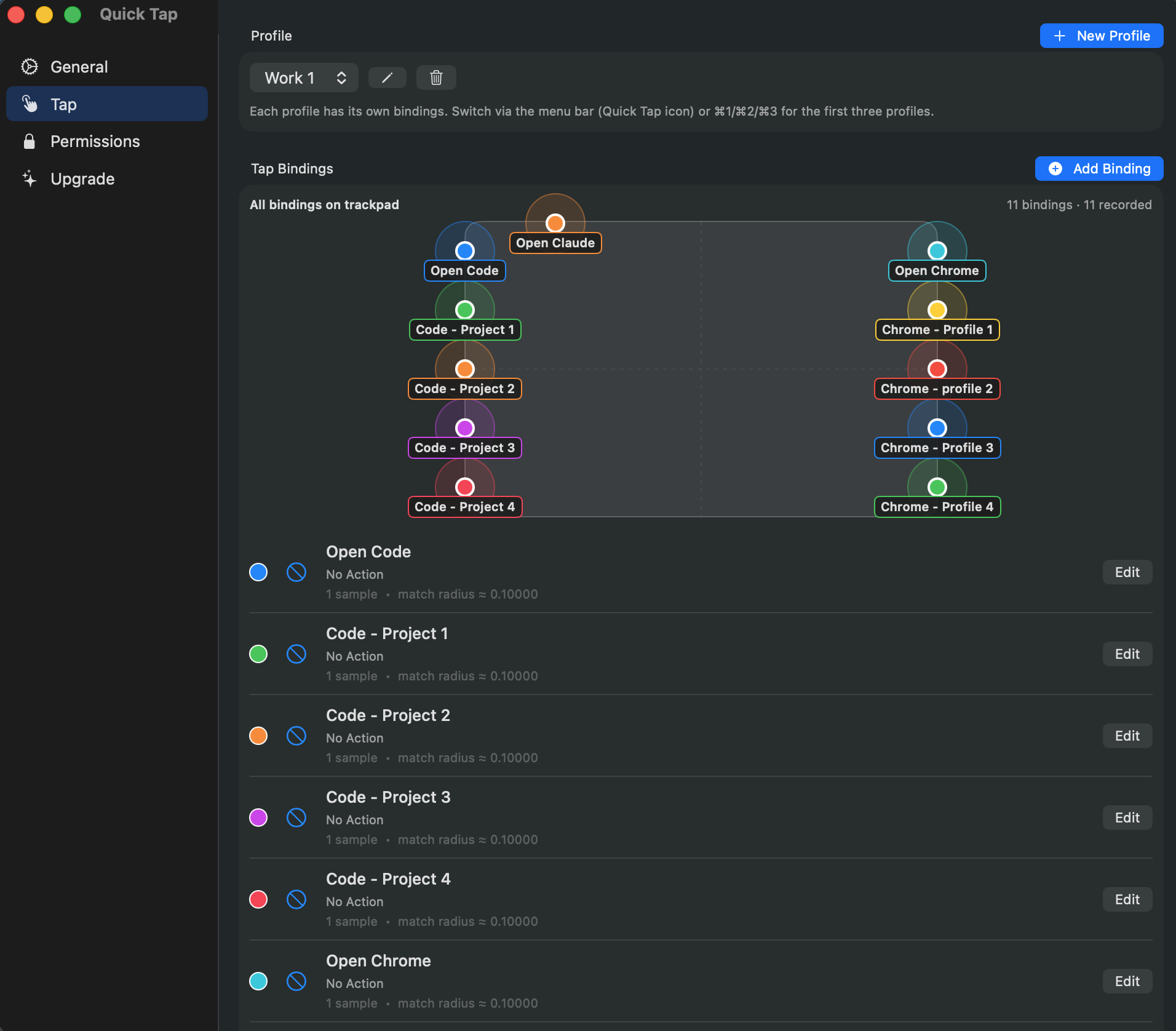
All your bindings, one view.
Every spot you've trained, color-coded on a live map of the trackpad. Switch the active profile and the whole map changes — same hardware, different bindings.
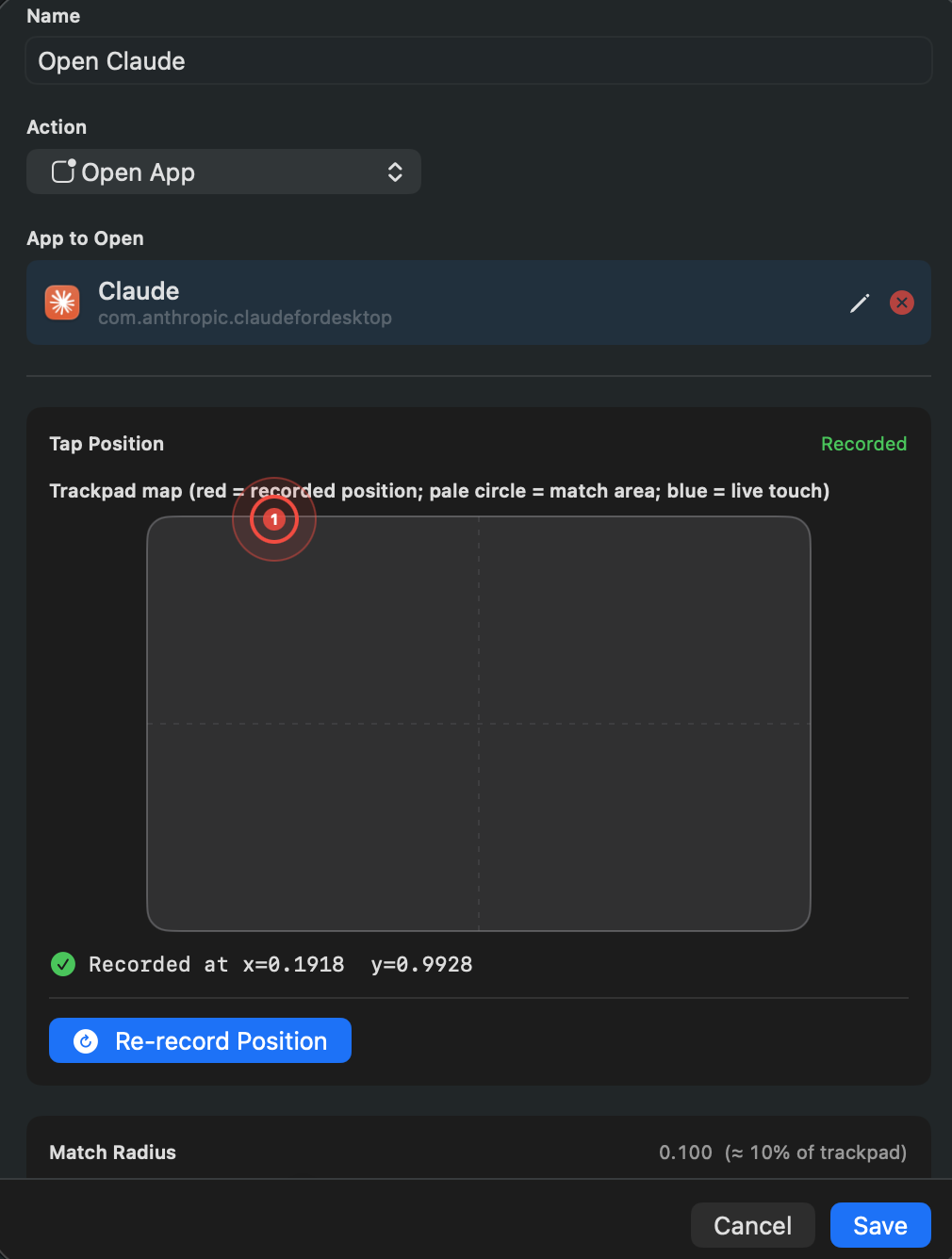
Touch the trackpad to record a spot.
Pick an action — open an app, run a shortcut, hide the screen. Tap where you want it to live. QuickTap remembers the position to four decimals.
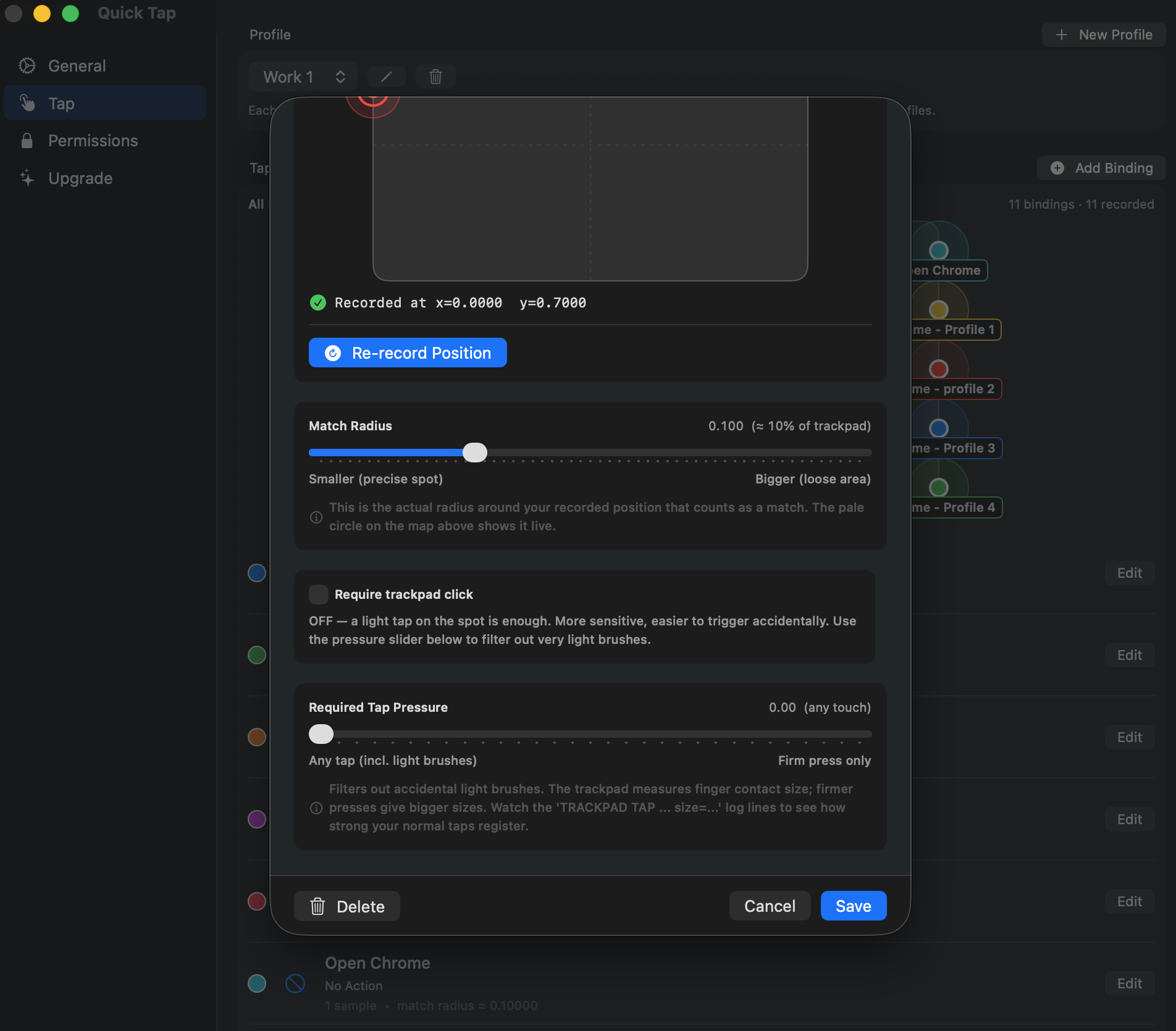
Tune every binding.
Match radius, required tap pressure, light tap vs. firm click. Tweak per-binding until misfires disappear and the right taps always land.
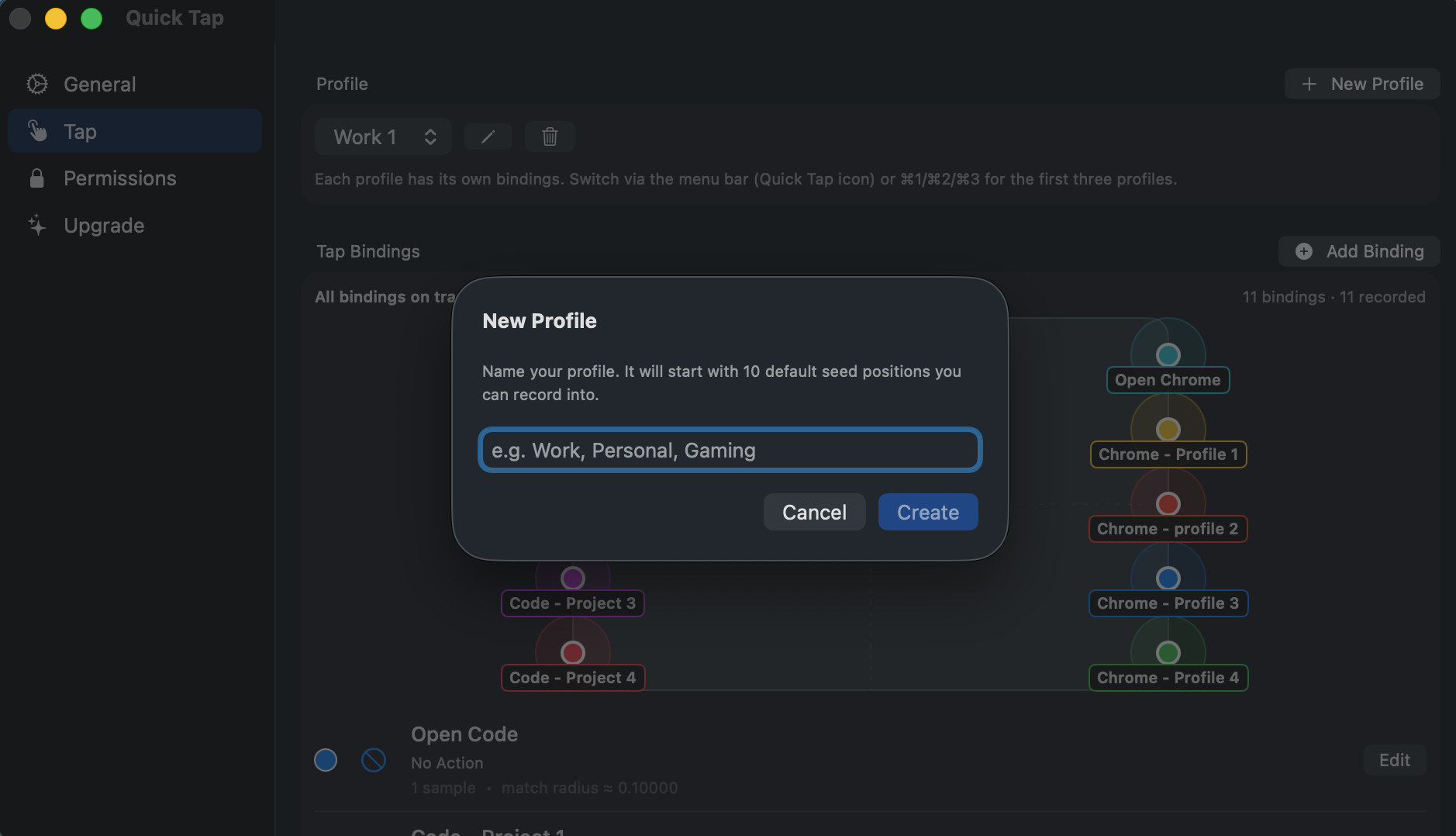
Profiles for every workflow.
Work, Personal, Gaming — each with its own bindings. Switch with ⌘1 / ⌘2 / ⌘3, or from the menu-bar icon.
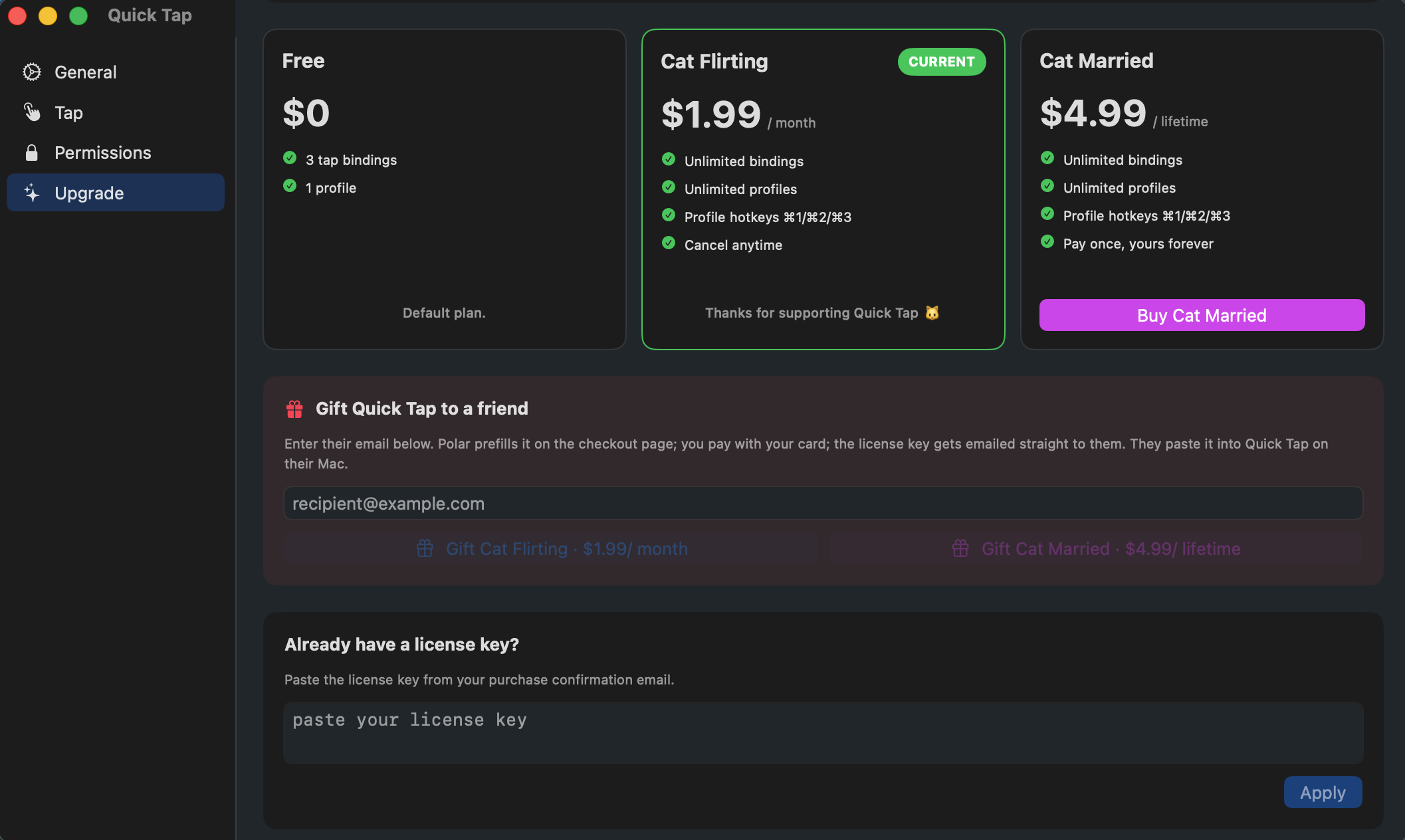
Try free. Upgrade when ready.
Three bindings free, forever. Cat Flirting unlocks unlimited bindings + multiple profiles + profile hotkeys for a monthly fee. Cat Married is the same, but a one-time payment.
Why not just ⌘-Tab?
Fair question. Here's where QuickTap is different from the obvious alternatives. We're honest about what overlaps.
⌘-Tab is great for jumping between apps — but it can't switch between several windows of the same app, can't hide your screen, and needs both thumbs every time.
BTT can do almost anything if you spend hours configuring it. QuickTap is the ‘tap-on-the-body, one-action-per-spot’ subset, set up in two minutes.
Most are gesture-based — swipes, pinches, three-finger taps. QuickTap is the only one that maps actions to a physical spot on the laptop body.
Comparisons are based on the headline features of each product as of 2026. Power users of BetterTouchTool can script their way to most of this; we just think the default experience should be 2 minutes, not 2 hours.
Three steps. Two minutes.
Download and open.
QuickTap installs in seconds. It lives in your menu bar — no dock icon, no window.
Pick what a tap does.
Cycle windows. Switch apps. Hide screen. Run a keyboard shortcut. Change it whenever you want.
Tap your laptop.
Anywhere on the body works — the lid, the deck, even the table next to it. It just works.
Quietly trustworthy.
No dark patterns. No surprise charges. No data extraction. Just an app that does one thing and stays out of your way.
Apple notarized
Code-signed and notarized by Apple. macOS opens it without scary warnings — Gatekeeper-approved.
Offline-first
Zero network calls. No telemetry, no account, no cloud. The app literally can't phone home.
Pay once. Or never.
Free tier is real — 3 bindings + 1 profile forever. Upgrade only if you want unlimited.
Active Discord
Real humans (the dev included) trading tap setups and helping each other tune sensitivity.
Built by an indie dev who ⌘-tabbed too much.
Hi, I'm Tho. I built QuickTap because juggling a dozen windows on a thin laptop is silly when the trackpad is right there. It's a one-person operation — fast bug fixes, weird features that actually ship, and a real human reading every email.
Give the gift of taps.
Buy QuickTap for a friend, a sibling, that one developer who has 45 tabs open. Polar emails them the download link and license key — they tap, you look thoughtful.
- Enter their email at checkout — Polar delivers everything
- Same full license as a regular purchase, theirs forever
- Add a personal note that goes in their delivery email
Frequently asked.
Will tapping my MacBook damage it?
No. QuickTap reads motion, not impact — a gentle finger tap is enough. You're not knocking on it like a door. We tune sensitivity so the lightest tap registers.
Does it work on Intel Macs?
Yes. Any Mac running macOS Sonoma 14 or later — Intel or Apple Silicon.
When is the Windows version?
We're building it. The Windows version will use the same approach — read the laptop's motion sensor, map taps to actions. We don't have a date yet. Drop us a line if you want a heads-up.
Does QuickTap send anything over the internet?
No. Zero network calls. No analytics, no telemetry, no update pings. The app is offline-first because that's the only mode it has.
What permissions does it need?
Two. Accessibility, so QuickTap can switch apps and windows on your behalf. And a Login Item / Background helper, because reading the laptop's built-in motion sensor on macOS requires a small system-level helper. macOS prompts you to allow both on first launch — one click each. No microphone, no internet access, no kernel extension.
I have several windows of the same app. Will tap switch between them?
QuickTap activates apps, and macOS then brings forward the frontmost window of that app on your current Space. So if you keep all your Chrome windows (or all your Code windows) on the same Space, a single tap can flip you between them. If you spread the same app's windows across multiple Spaces, macOS only brings forward the one on the Space you're currently viewing — tap won't pull a window from a different Space. Best practice: keep windows you want to tap-switch between on the same Space.
My desk wobbles. Will it tap by accident?
Tune sensitivity down in settings. Most people land on a setting where a casual hand-rest does nothing and a deliberate tap always works. QuickTap also adds a short dead-zone after each registered tap so the sensor doesn't double-fire on a single knock.